
Within two years, a single developer using AI can ship UI code that once took a team of three. Is that progress—or a threat?
Being Replaced?
TL;DR: AI-driven UI coding tools like GitHub Copilot, v0 by Vercel, and Cursor are transforming how developers build interfaces—automating repetitive code, accelerating prototyping, and lowering the barrier to entry. Developers who adapt by focusing on architecture, logic, and product thinking will thrive. Those who don’t risk being left behind.
Developers used to spend hours writing boilerplate code. Now, they describe what they want in plain English—and watch it appear on screen in seconds. That shift isn’t hypothetical. It’s happening right now, across teams at startups and Fortune 500 companies alike.
AI-driven UI coding is reshaping the front-end development landscape faster than most predicted. The tools are smarter, the output is more reliable, and the implications for developers are significant. Whether you’re a seasoned engineer or someone just entering the field, understanding this transformation isn’t optional—it’s essential.
This guide breaks down what AI-driven UI coding actually is, which tools are leading the charge, what’s changing for developers, and what skills will matter most going forward.
| Step | What Happens |
|---|---|
| 1. Prompt | Developer or designer describes the UI in plain language |
| 2. Generation | AI produces component code (HTML, CSS, JSX, etc.) |
| 3. Review | Developer reviews, edits, and refines the output |
| 4. Integration | Code is integrated into the codebase |
| 5. Iteration | Developer prompts further changes as needed |
This loop replaces—or dramatically compresses—the traditional write-test-debug cycle.
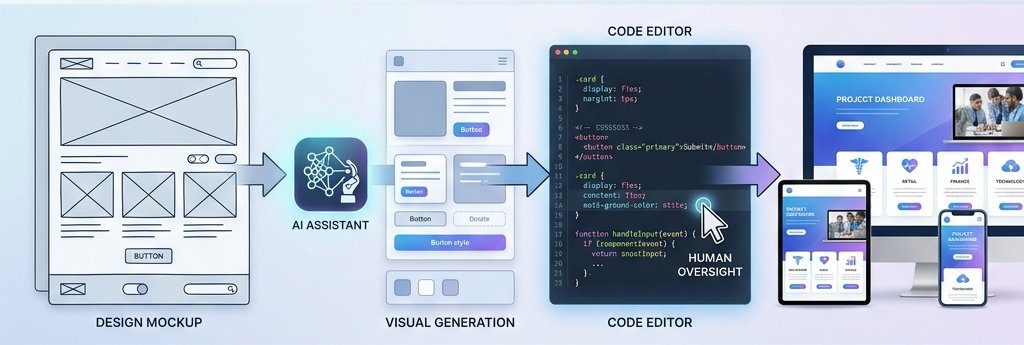
Several tools have emerged as frontrunners in this space, each with a different focus and use case.
| Tool | Primary Use | Best For |
|---|---|---|
| GitHub Copilot | In-editor code suggestions | Developers working in VS Code, JetBrains |
| v0 by Vercel | UI generation from text prompts | Rapid front-end prototyping |
| Cursor | AI-native code editor | Full project-level AI assistance |
| Builder.io | Visual-to-code generation | Design-to-code workflows |
| Locofy.ai | Figma-to-code conversion | Design handoff automation |
| Anima | Design-to-React conversion | Front-end teams using Figma |
Choose v0 or Builder.io if your priority is fast prototyping with minimal setup. Choose GitHub Copilot or Cursor if you want AI assistance embedded directly in your existing development workflow.
The disruption isn’t subtle. AI is compressing timelines that used to take days into hours—and hours into minutes.
A UI prototype that once required a full sprint can now be produced in an afternoon. Tools like v0 by Vercel allow teams to generate functional component libraries from a single design brief, then iterate rapidly based on feedback.
Junior developers can now produce output that would have previously required senior-level experience. AI tools handle syntax, accessibility basics, and component structure—freeing less experienced developers to focus on higher-level problems.
Historically, one of the most friction-heavy parts of product development was the transition from design to code. Designers produced mockups; developers interpreted them. Tools like Locofy.ai and Anima are eliminating that gap, converting Figma designs directly into production-ready React or Vue components.
What AI handles well
• Generating repetitive UI components (cards, modals, forms, navbars)
• Writing CSS utility classes and responsive layout logic
• Converting design specs into code
• Autocompleting functions and fixing syntax errors
• Producing accessible HTML structures
What AI still struggles with
• Complex state management across large applications
• Deep system architecture decisions
• Understanding business logic and edge cases
• Debugging subtle rendering or performance issues
• Making product-level tradeoffs
The developers who will thrive are those who position themselves as AI orchestrators—people who know how to direct, evaluate, and refine AI output rather than simply write code line by line.
The role of the front-end developer is evolving, not disappearing. Here’s what matters most going forward:
The trajectory is clear. AI tools will become more accurate, more context-aware, and more deeply integrated into development environments. A few developments worth watching:
These aren’t distant possibilities. GitHub Copilot Workspace and Cursor’s composer feature are already moving in this direction.
AI-driven UI coding is not a future trend—it is the current reality of front-end development. Teams that integrate these tools are shipping faster, iterating more freely, and spending less time on work that machines can handle competently.
The developers who will define the next generation of digital products aren’t the ones who resist these tools. They’re the ones who master them—using AI to handle the routine while they focus on the work that genuinely requires human judgment.
Start by experimenting with one tool. Build something small. Pay attention to where the AI helps and where it falls short. That firsthand understanding is more valuable than any summary of the landscape.

SEO EXPERT
Signup our newsletter to get update information, news, insight or promotions.
One Response
Great content! Keep up the good work!